See how it works from the inside.
Interactive guides that open up the equipment a business runs on, and the office work around it. Click the parts, follow what flows through them, and see what changes when something breaks.
How the equipment works.
- Heating and cooling
How a split system works
A cutaway of a ducted split system and a ductless mini-split. Follow the refrigerant around the loop, run it as a heat pump on a cold New Hampshire night, and break it the ways it breaks in the field.
- Click any of 12 parts to see what it does and what goes wrong with it
- Step through the refrigerant loop in cooling and in heating
- Drop the outdoor temperature and watch backup heat come on
- Choose from six common faults and see what the caller notices
For owners, dispatchers, customer service reps and new techs
Open the guide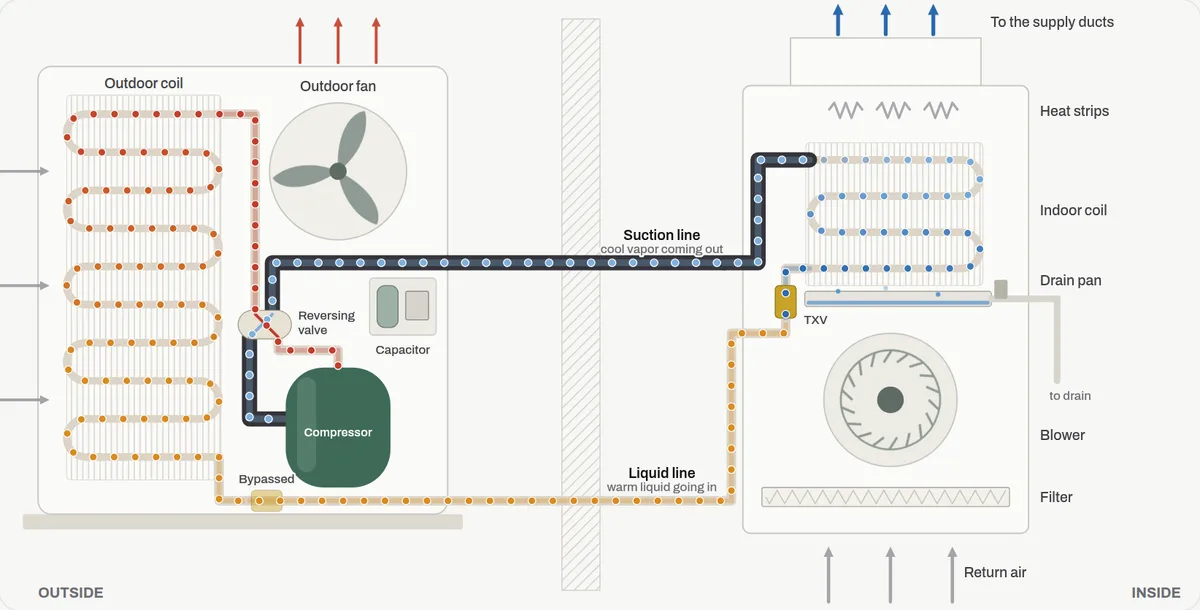
- Water wells
How a well pump works
A cutaway of a drilled bedrock well with a submersible pump, the setup most New Boston houses have. Run the faucets, watch the pressure tank and switch cycle the pump on a live chart, and break it the ways it breaks.
- Click any of 14 parts, from the well cap to the relief valve
- Follow the water from the pump to the kitchen faucet
- Change the water use and the switch setting and watch the pressure chart
- Choose from six common faults, from a waterlogged tank to a well running low
For homeowners on a well, office staff at pump and well companies, and new techs
Open the guide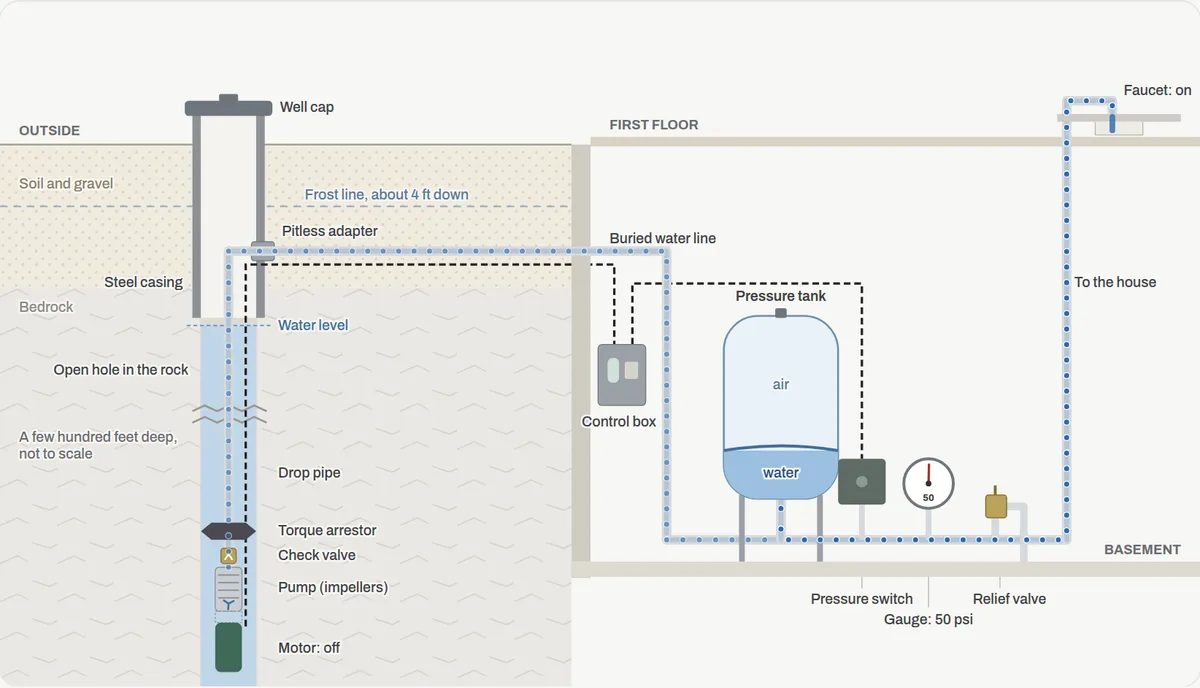
- Septic systems
How a septic system works
A cutaway of a conventional septic system from the house drain to the leach field. Flush a toilet or run the washer, let the years go by without a pumping, and break it the ways it breaks.
- Click any of 12 parts, from the cleanout to the soil under the trenches
- Send water through the tank and watch it settle and split between the trenches
- Drag the years since pumping and watch the clear zone shrink
- Choose from six common faults and see where the water backs up
For homeowners with a septic system, office staff at septic companies, and new techs
Open the guide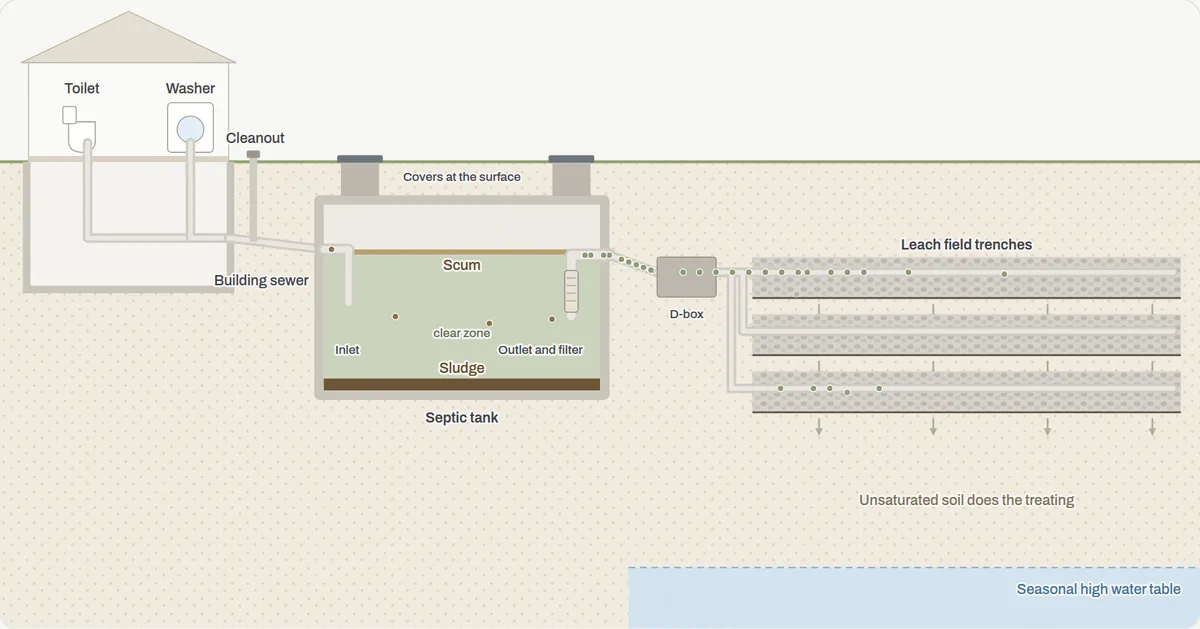
- Standby generators
How a standby generator works
A cutaway of a house with a propane standby generator and an automatic transfer switch. Cut the power and follow the transfer second by second, choose what the generator has to run, and break it the ways it fails in a storm.
- Click any of 11 parts, from the transfer switch to the propane tank
- Cut and restore the power and read the outage log as it happens
- Switch loads on and off against a 14 or 22 kW generator
- Choose from six common faults, from a weak battery to too much load
For homeowners with a generator, office staff at generator dealers and electricians, and new techs
Open the guide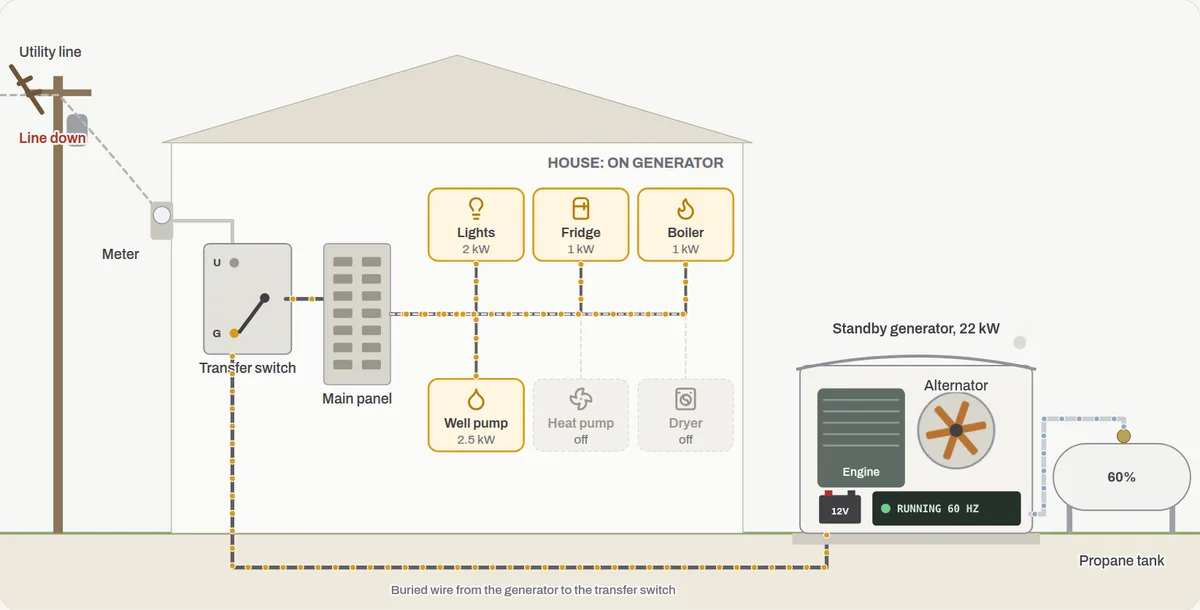
- Electrical
How the panel and transfer switch work
The house side of a standby generator: the service, the main panel, the transfer switch, and which circuits the generator reaches. Compare a critical-load subpanel with a whole-house switch, overload the generator, and see what backfeeding does.
- Cut the power and watch the transfer switch move circuits to the generator
- Compare a critical-load subpanel with a whole-house switch and load manager
- Switch circuits on and off against the generator's size
- Choose from six faults, from a tripped main to a lost neutral
For homeowners with a generator, office staff at electrical contractors and generator installers, and new techs
Open the guide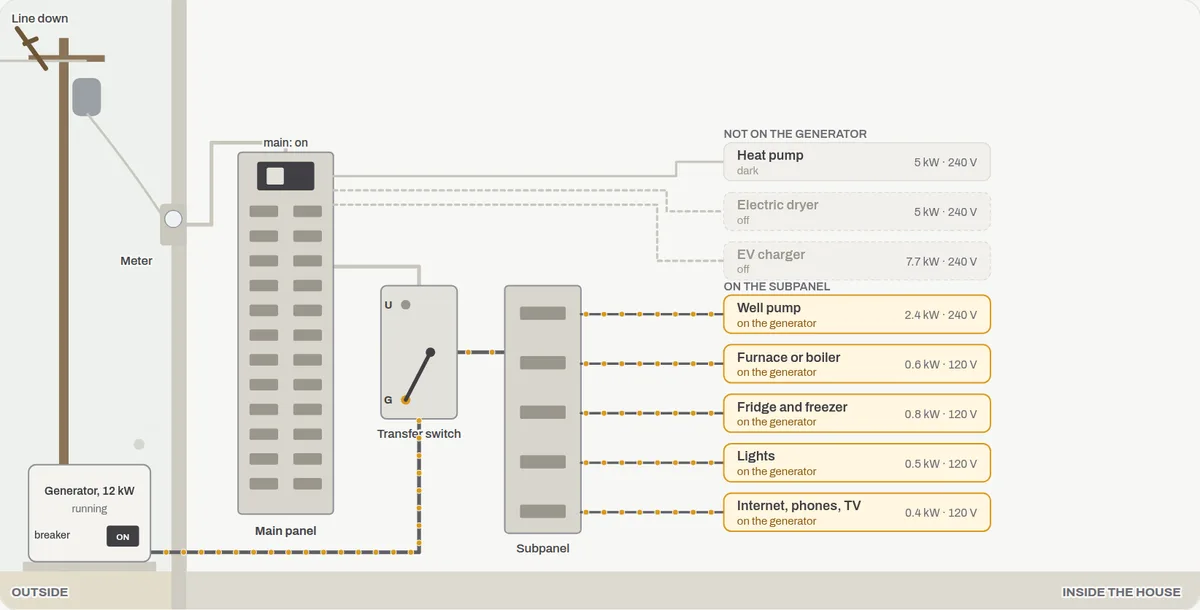
- Water treatment
How well water treatment works
A basement treatment line for a New Hampshire bedrock well. Enter a water test, watch each unit catch its own contaminants, take units out to see what gets through, and break it the ways it fails.
- Set hardness, iron, arsenic, radon, bacteria and sediment, or start from a preset
- Add or remove each unit and read the result at the kitchen tap
- Watch the softener's resin fill up and regenerate from the brine tank
- Choose from six common faults, from a salt bridge to a bypass left open
For homeowners on a well, office staff at water treatment companies, and new techs
Open the guide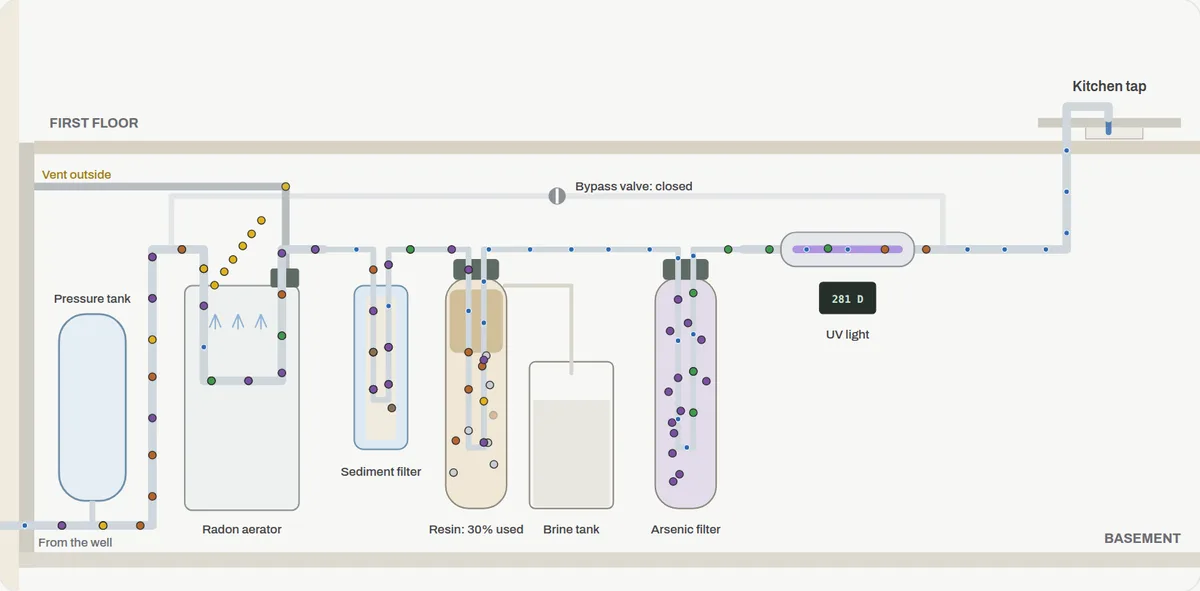
- Oil heat
How an oil boiler and baseboard heat work
A cutaway of an oil-fired boiler in a New Hampshire basement heating the room above through baseboard. Watch the burner light and the temperatures chart, drop the outside temperature, and break it, reset button and all.
- Click any of 16 parts, from the oil tank to the thermostat
- Watch the light-off sequence and the room and boiler temperatures on a live chart
- Change the setpoint, the outside temperature and the oil in the tank
- Choose from six common no-heat faults and press the reset button
For homeowners with oil heat, office staff at oil dealers and heating companies, and new techs
Open the guide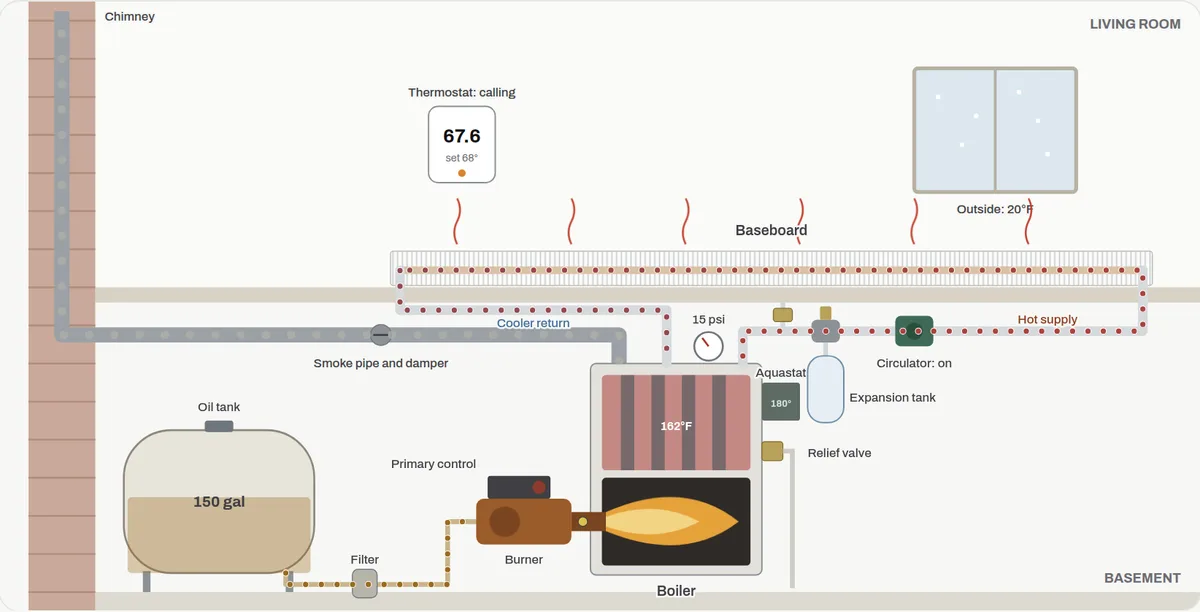
- Forced-air heat
How a propane furnace works
A cutaway of a condensing propane furnace in the basement and the ductwork to the rooms above. Follow the light-off step by step, read the control board's blink code, and break it the ways it breaks after a storm.
- Click any of 16 parts, from the inducer and pressure switch to the CO alarm
- Watch each light-off step prove itself, and the room and supply air on a live chart
- Change the thermostat and the outside temperature
- Choose from seven common calls, including a carbon monoxide alarm
For homeowners with a furnace, office staff at heating contractors, and new techs
Open the guide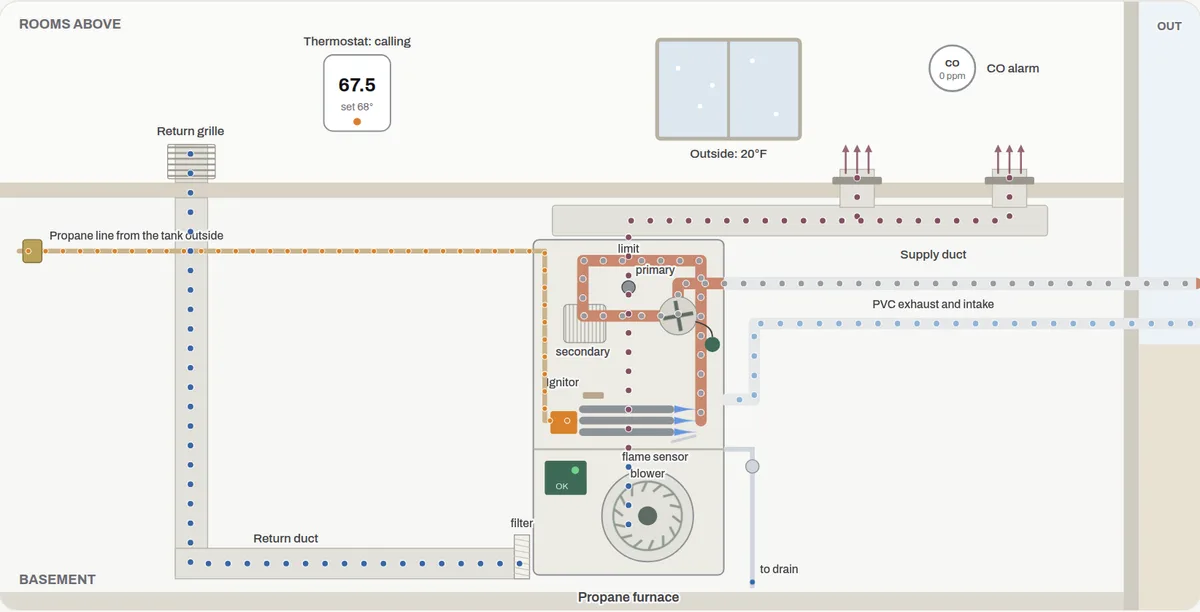
- Small engines
How a snowblower works
An isometric two-stage snowblower you can run: the augers gather, the impeller throws, the friction drive walks it forward. Change the snow and the gear to load the engine, then break it the ways it breaks on the first storm.
- Click any of 13 parts, from the shear pins to the friction drive
- Start the engine, squeeze the levers and pick one of eight speeds
- Aim the chute and change the snow and its depth to see the load and the throw
- Choose from six common faults, from a sheared pin to stale gas
For homeowners, office staff at small-engine shops and equipment dealers, and new techs
Open the guide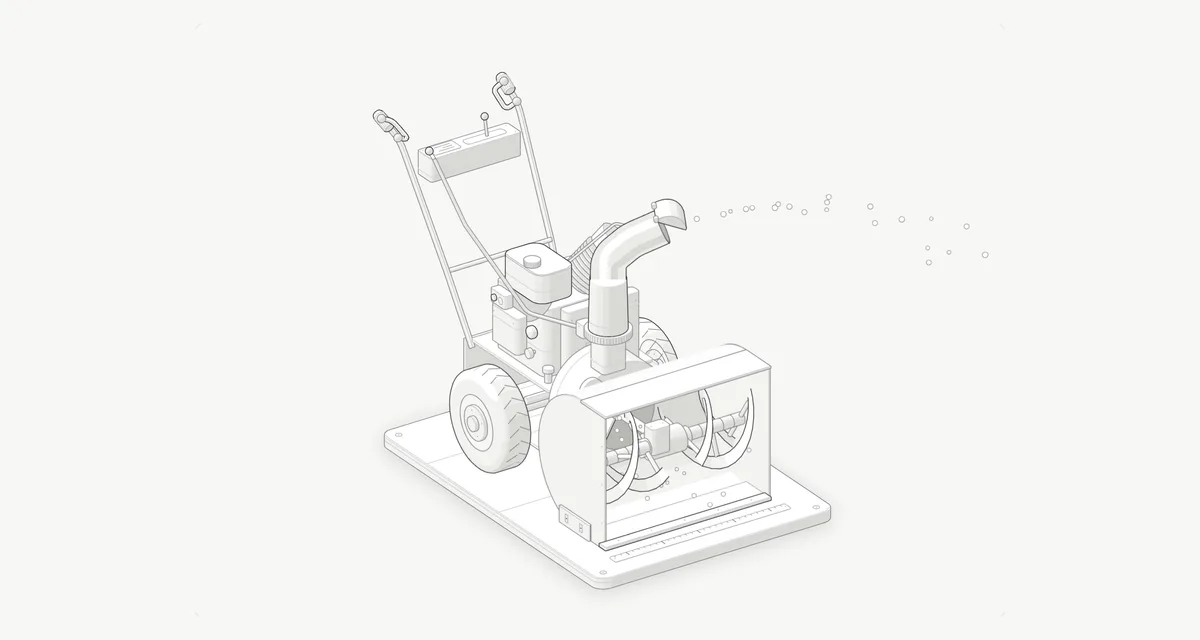
- Roofing and insulation
How ice dams form
An isometric cutaway of a roof edge, from the attic floor to the gutter. Set the weather, the insulation, the air sealing and the vents, run the clock and watch a dam build, then try the quick fixes and the lasting ones.
- Click any of 13 parts, from the soffit vent to the ice and water shield
- Change the outside temperature and the snow, and read the attic and roof temperatures
- Run a week and watch the dam grow, the pond form and the leak start
- Compare five houses, then rake, lay a sock or seal the attic
For homeowners, office staff at roofing and insulation companies, and new crew members
Open the guide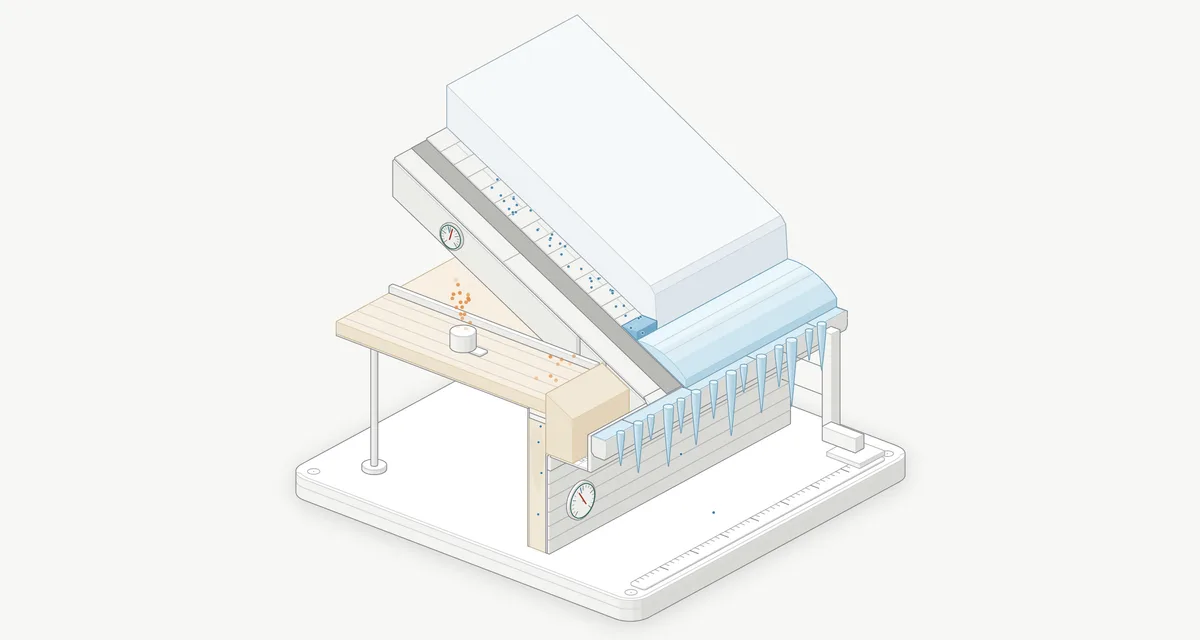
- Electric utilities
How a substation works
An isometric model of a distribution substation, from the transmission lines at the back to the feeders under the front fence. Watch the power split around the ring, heat the transformers on a hot afternoon, play six kinds of trouble, and open the breakers and switches yourself.
- Click any of 24 parts, from the shield wires to the station battery
- Run a day and watch the fans, the tap changers and the capacitor bank respond
- Play lightning, a tree limb, a car, a squirrel or a transformer fault, with the SCADA log
- Take a breaker out for maintenance in the right order, on the drawing or the one-line
For electric co-ops and municipal utilities, electrical contractors, and anyone curious about the fenced yard down the road
Open the guide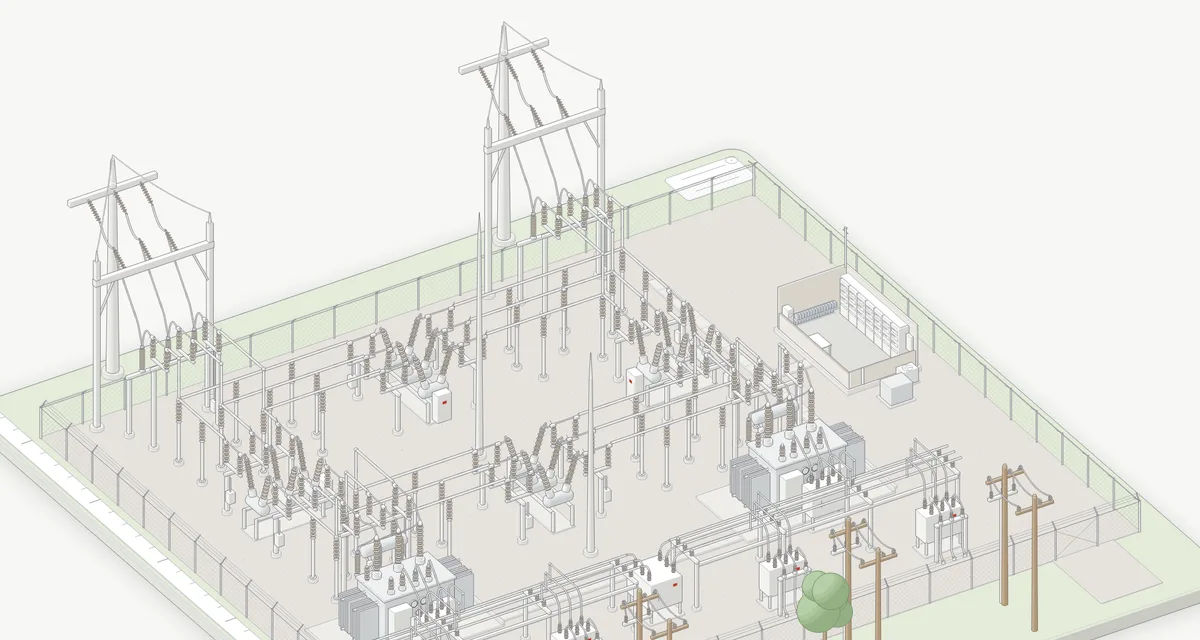
How the office handles it.
The equipment guides show how the plant works. These show the office: the calls, notes and hand-offs between a customer's problem and the truck in the driveway.
- Heating service office
The after-hours no-heat call
A cutaway of the call itself: the after-hours line, the intake questions mapped to the heat pump and oil boiler guides, the dispatch note, the on-call tech and the truck. Play a call, then break it the ways these calls go wrong.
- Play a heat pump or an oil boiler call and watch the dispatch note fill in
- Click any of 9 stages, from the phone line to the morning review
- See which part in the equipment guides each question comes from
- Break it four ways, then run it again with the check that fixes it
For owners and office managers at heating companies, dispatchers, and on-call techs
Open the guide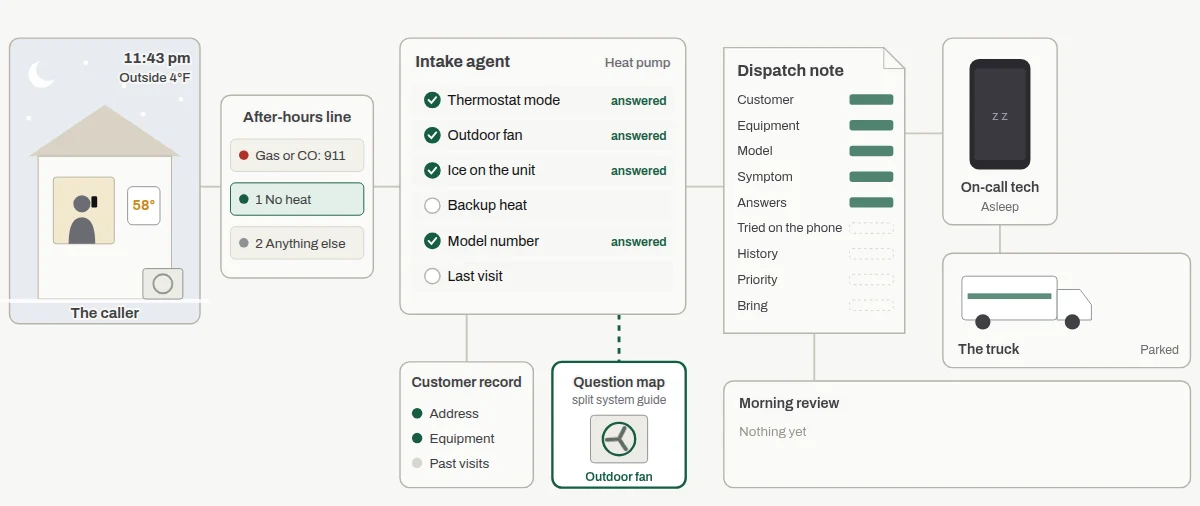
- Boarding barn office
When a stall opens
A boarding barn's waitlist, from the inquiry form to move-in day. Watch the stall board, the offer and the deposit, then break it the ways barns lose a boarder or forget a horse's extras.
- Follow one horse from the inquiry form to its stall card
- Click any of 9 stages, from the waitlist row to the boarder packet
- Watch the stall board hold a stall for one person at a time
- Break it three ways, then run it again with the check that fixes it
For barn owners and managers, and the people who run a boarding barn's office
Open the guide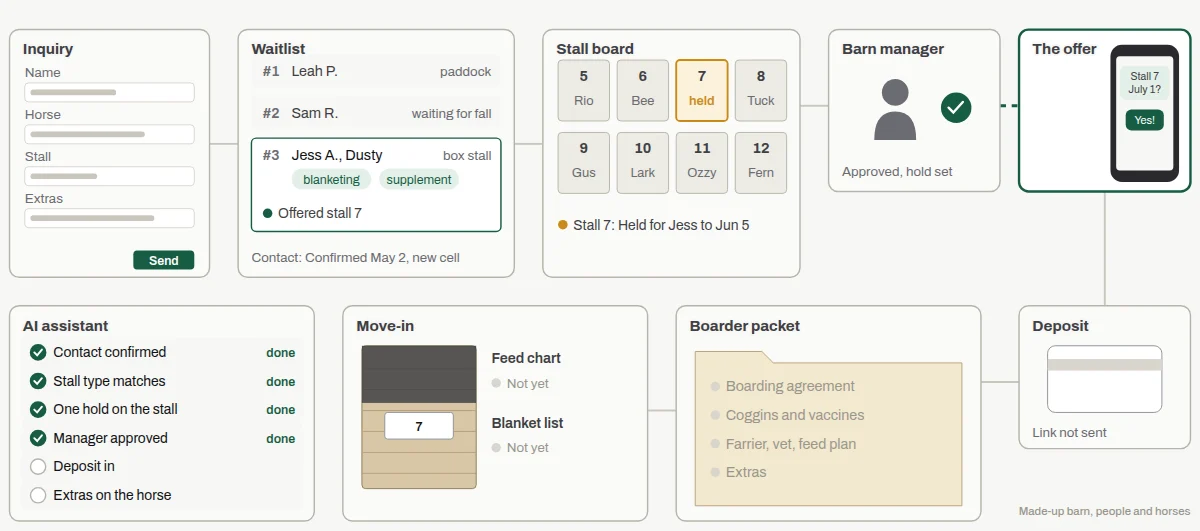
- Service office
A customer asks for one more service
A family with two horses at a boarding barn asks for one of them to be clipped and blanketed. Watch the request go from a text message to the right visit and the right bill, then see the same steps at an oil company and a well company.
- Switch between a boarder, a boiler contract and a well customer
- Watch the add-on land on the right horse or house, or the wrong one
- See the quote, the customer's yes, the calendar and the ticket fill in
- Break it three ways, then run it again with the check that fixes it
For owners and office staff at barns and service companies, and the techs who carry the tickets
Open the guide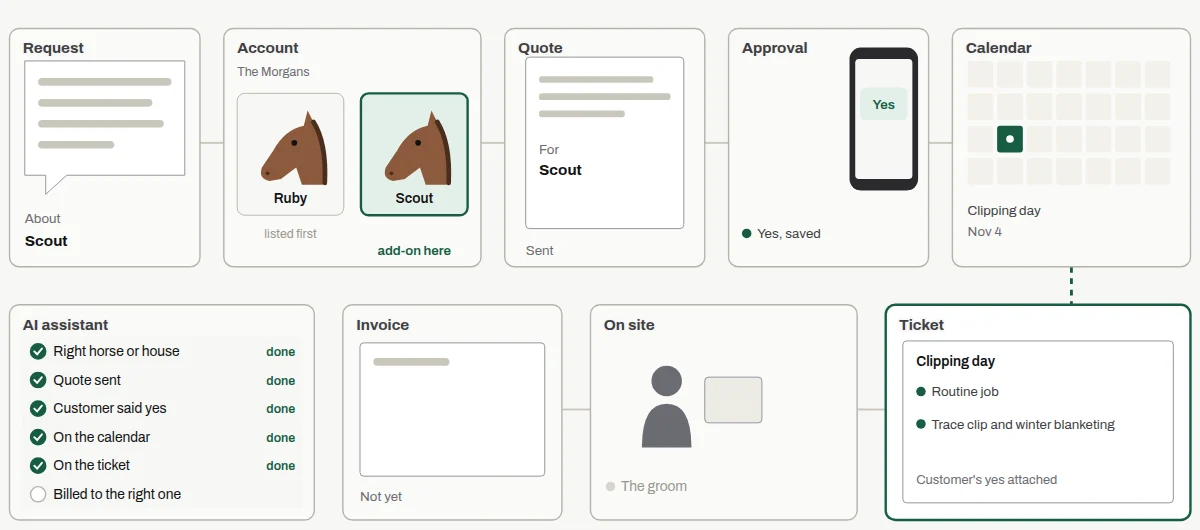
Every guide follows the same path.
- 1
Open it up
Each guide starts with a cutaway you can click. Every part explains what it does, where it sits and how it fails.
- 2
Follow what flows
Refrigerant, air, water, a work order: whatever moves through the system, you can trace it step by step and watch it change.
- 3
Break it on purpose
Pick a common fault and the drawing changes to match. You see the symptom the customer notices next to the cause the tech finds.
We can build one for your equipment.
If your business runs on equipment your customers don't understand, a guide like this can do a lot of explaining for you. We build them around your own equipment, your service calls and the questions your office answers every day.
Training new staff
A new customer service rep learns why "is the outdoor fan spinning?" matters before they take their first no-heat call.
Explaining a repair
A tech sends the customer the guide showing the part that failed, so the customer understands the quote.
Teaching an AI agent
The questions in the guide become the intake script an after-hours agent asks, so the tech gets useful answers before the truck rolls.