On October 20, details of two serious flaws in PHP leaked online a day before they were supposed to be announced. Security researchers are calling the pair "PHP2Shell." PHP is the programming language WordPress runs on, so if your nonprofit's website is a WordPress site, it runs on PHP too. Fixes came out on October 21. This post covers what happened, how to find out whether your site is exposed, and what to ask your hosting company.
This is written as of October 21, 2026. The story is moving quickly, so check the sources at the end for updates.
What the flaws do
The two bugs are tracked as CVE-2026-109618 and CVE-2026-109619. Both are in PHP itself, not in WordPress, a theme or a plugin. The PHP security team rated both 9.2 out of 10.
In plain terms, a stranger on the internet can send a specially built request to a site running a vulnerable version of PHP and, under some conditions, run their own code on the server. They don't need a password or an account on the site. Wiz Research, which found the bugs, says every PHP version back to 5.4 has at least one of them, and it showed the attack working against a current WordPress install.
Once someone can run code on your server, they can add spam pages, send visitors to scam sites, read whatever the site stores (form entries, donor emails, saved passwords for connected services) or use your site to attack others.
Is anyone using it yet?
Reports differ. Patchstack, a WordPress security company, says hosting companies reported attacks on the morning of October 21 and Cloudflare reported early attack traffic, though Patchstack's own data showed mostly probing at that point. watchTowr says it has seen exploitation on its decoy servers. The Dutch national cyber security center said it had no confirmed attacks yet, but noted that working exploit code is public and expects widespread attacks soon.
Either way, automated tools scan the whole internet for vulnerable servers. A small nonprofit site gets scanned just like a large company's.
Which versions are fixed
PHP released these fixed versions on October 21:
| PHP line | Fixed version |
|---|---|
| 8.5 | 8.5.12 |
| 8.4 | 8.4.27 |
| 8.3 | 8.3.36 |
| 8.2 | 8.2.35 |
PHP 8.1 and anything older (8.0, 7.4, 7.x, 5.x) no longer gets updates from the PHP project. Some hosting companies and Linux vendors patch older versions on their own, but many don't. If your site is on one of those older versions, the safe assumption is that it stays vulnerable until it moves to a supported version.
This matters for nonprofits in particular. A lot of small sites were set up years ago and have been sitting on PHP 7.4 because "it still works," often because an old theme or plugin breaks on anything newer.
How to check your PHP version
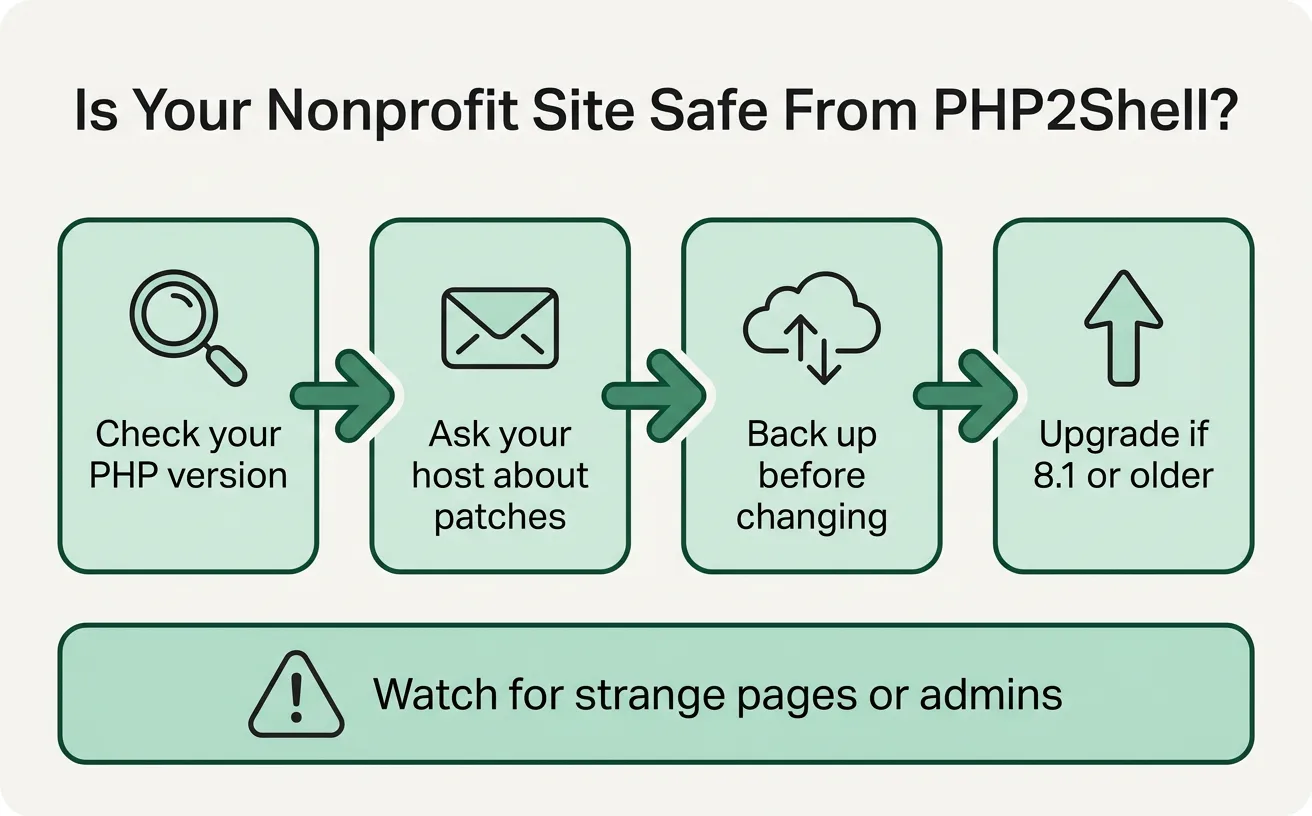
If you can log in to your WordPress dashboard:
- Go to Tools → Site Health.
- Click the Info tab.
- Open the Server section and look for PHP version.
If you can't log in, your hosting company's control panel (cPanel, Plesk or similar) usually shows the PHP version under a "PHP version" or "MultiPHP" setting. Or just ask the host.
What to ask your hosting company
Most nonprofit sites are on shared hosting, which means you can't update PHP yourself. The host does it for every site on the server. Send them a short note:
Our website [address] runs WordPress. Has our server been updated for the PHP vulnerabilities CVE-2026-109618 and CVE-2026-109619? Which PHP version is our account running? If it's 8.1 or older, do you have a patched build, or do we need to move to a supported version?
A good host will answer quickly and tell you the exact version. If the answer is vague, or your site is on 8.1 or older with no patch, that's a reason to plan an upgrade now.
Things not to do
- Don't install a "PHP2Shell fix" plugin. A WordPress plugin can't fix PHP itself, and fake security plugins are a common way to get malware onto a site.
- Don't paste code snippets from forums into your site's settings. The temporary workarounds being discussed have to be set in the server's configuration, which only the host controls on shared hosting.
- Don't switch PHP versions in your control panel without a backup. Jumping from 7.4 to 8.3 can take a site down if an old theme or plugin isn't ready for it. Make a full backup first, and test if you can.
Signs something is already wrong
Your host is better placed to look at server logs, but you can watch for:
- New pages, posts or admin users you didn't create
- Visitors or Google warning that your site sends people somewhere strange
- The site suddenly showing errors or going down for no clear reason
- A message from your host about unusual activity
If you see any of these, tell your host right away, and change the passwords for the WordPress admin, the hosting account and any services the site connects to (your email sender, your donation platform, your mailing list). The flaws can expose what's in the server's memory, so treat saved keys and passwords as possibly seen.
Where we can help, at no cost
T10 runs a free website and security program for New Hampshire nonprofits. For PHP2Shell, that can mean:
- Checking which PHP version your site runs and whether your host has patched it
- Writing to your host for you, or sitting with you while you do it
- Planning a move off PHP 7.x or 8.0/8.1: a backup first, then checking your theme and plugins against a supported version
- Cleaning up afterward if something got in
You can also run our free website check yourself. It reads only what's public, and it flags when a server announces its software version to the world, which is often how scanners pick targets.
If you look after a nonprofit's website as a volunteer or a board member and you aren't sure where to start, send us a note. We'll help you work out what you have and what to do next.
Sources
- Patchstack: PHP vulnerable to critical RCE, attacks ongoing
- UK National Cyber Security Centre: Critical security issue affecting PHP
- watchTowr: PHP CVE-2026-109618 FAQ
- Huntress: php2shell, leaked critical PHP vulnerabilities
- BleepingComputer: PHP warns admins of two critical flaws
This post is general information for nonprofit website owners, not a full security assessment. If you think your site has been broken into, contact your hosting company first.